
Announcements
Attention all students, faculty members, and staff:
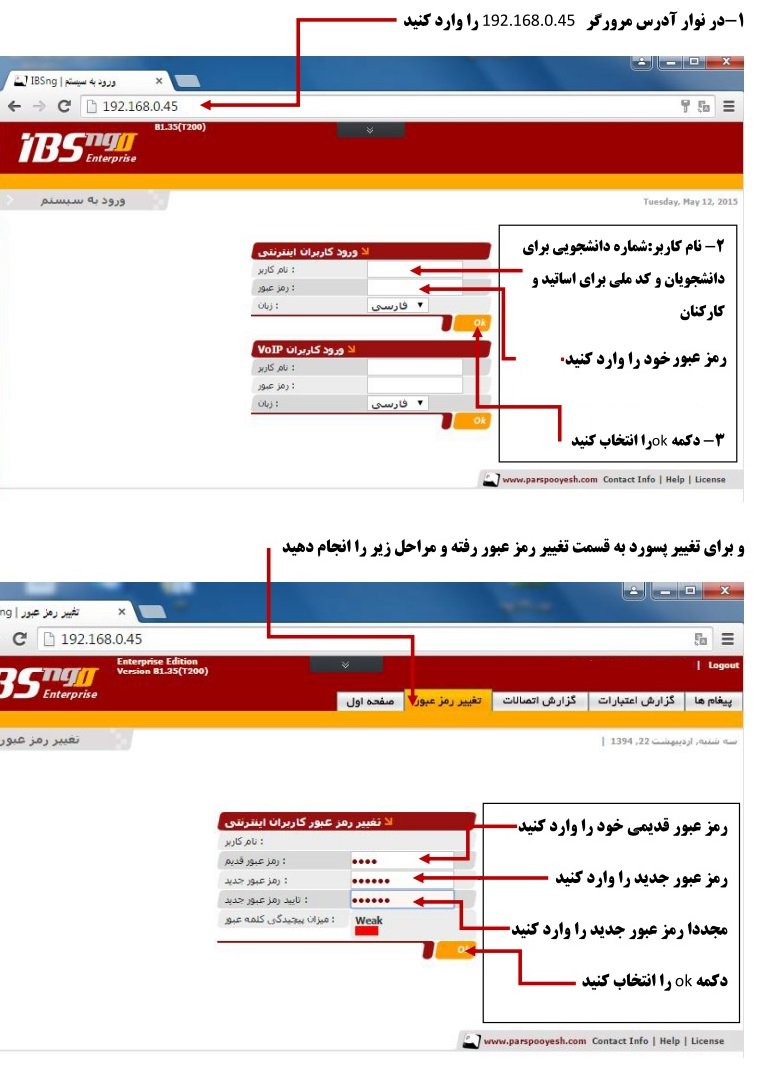
To utilize the university's internet, please follow these steps:
Turn on your Wi-Fi and connect to an access point.
Using a browser on your mobile device or laptop, navigate to internet.lu.ac.ir
On the page that opens, enter your username and password in English and confirm to access the internet.
To disconnect from the internet, please revisit internet.lu.ac.ir and terminate the connection.
If you have forgotten your internet password or are experiencing difficulties logging in, please visit the Information Technology unit for assistance.
Before visiting this unit, please log in to your internet account via https://account.lu.ac.ir/IBSng/user and, after confirming the correctness of your password, daily volume, and monthly time credit, bring your student ID card and discuss your issue in person with this unit.